How to Setup Whatsapp store easily with HelloVcard
Turn chats into sales with a WhatsApp store(shop) on your Vcard. No coding, no apps?just fast, simple setup and instant ordering via chat.
Updated: 07 May 2026 — expanded with first-order strategy, platform comparison table, and pre-launch optimisation checklist.
Most small business owners in India already take orders on WhatsApp. The problem is the workflow: a customer messages asking what is available, the owner types out a product list, the customer picks something, price and payment details get exchanged across multiple messages, and the order is confirmed after five minutes of back-and-forth.
HelloVcard's WhatsApp Store replaces that entire sequence with a structured catalogue and a single Order button. Here is exactly how to set it up — from account creation to first order — in under 10 minutes.
What You Need Before You Start
- A HelloVcard account (free — takes 2 minutes to create)
- Your business name, logo, and contact details
- Product photos and prices for your initial catalogue
- Your WhatsApp business number
- A UPI ID or payment link for order payment (optional for initial setup)
You do not need a website, a payment gateway account, or any technical knowledge. HelloVcard is configured entirely through a visual dashboard — no coding at any stage.
Step 1: Create Your Free HelloVcard Account
Go to hellovcard.com/register and sign up. Enter your name, email, and password. Your account is active immediately — no email verification wait, no credit card required.
Once logged in, you land on your dashboard. You will see two main sections: Digital Business Card and WhatsApp Store. Start with the business card section — it builds the professional profile that your customers see alongside your store catalogue.
Step 2: Set Up Your Business Card Profile
Complete your business card before adding store products. This profile is what customers see when they scan your QR code — your business name, logo, contact details, and WhatsApp button sit above your product catalogue on the same page.
Add: business name, your name and designation, phone number, email, WhatsApp number, and business address if relevant. Upload your business logo. Apply your brand colours using your exact hex codes. A complete profile builds trust before the first order arrives — 178 active HelloVcard profiles on the platform confirm that complete profiles generate more enquiries than incomplete ones.
Step 3: Set Up Your Product Categories
In your dashboard, navigate to the WhatsApp Store section and create your product categories first. Categories organise your catalogue and make it easy for customers to find what they are looking for without scrolling through an undivided list.
Examples by business type:
- Home baker: Cakes, Cookies, Brownies, Seasonal Specials
- Clothing shop: Sarees, Kurtas, Western Wear, Accessories
- Electronics: Phones, Accessories, Repairs, Refurbished
- Restaurant: Starters, Main Course, Beverages, Combos
Create 3-6 categories for your initial setup. You can add more later. Keep category names short and descriptive — customers scan them to decide where to look, not to read.
Step 4: Add Your Products
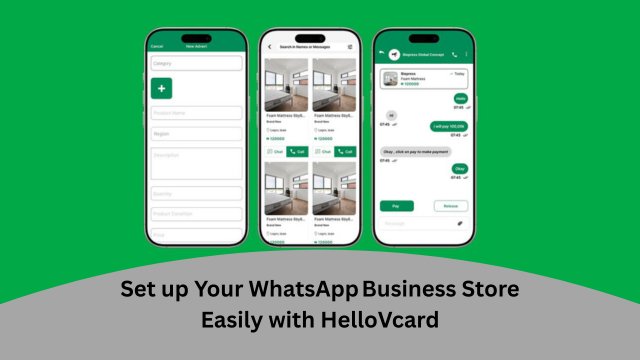
For each product, add: product name, price, a clear photo, a short description (2-3 lines maximum), and assign it to the relevant category. Mark availability — available or out of stock. The out-of-stock toggle is one of the most-used features by active HelloVcard store owners: it prevents orders for items you cannot fulfil without removing the product from your catalogue permanently.
Photo quality matters more than any other product listing element. A clear, well-lit photo of the actual product — not a stock image — drives significantly more order button taps than text descriptions alone. Shoot in natural daylight against a neutral background. Your phone camera is sufficient.
Across 11,380 tracked interactions on HelloVcard's platform, product listings with photos generate higher engagement than text-only listings. Start with your 5-10 best-selling products and expand the catalogue as you learn which listings perform best.
Step 5: Connect Your WhatsApp Number
In your WhatsApp Store settings, enter your WhatsApp business number. This is the number that receives order messages when customers tap the Order button on any product. When a customer places an order, HelloVcard pre-fills a WhatsApp message with the product name, quantity, and any variants the customer selected — and opens it directly in WhatsApp on their phone.
You receive a structured, clear order message rather than a fragmented chat. For a shop owner handling 20+ orders a day, this structured format saves significant time compared to ad-hoc WhatsApp ordering.
Step 6: Add a Payment Link
Add your UPI ID or a payment link to your store settings. HelloVcard can display your UPI QR code or payment link alongside your catalogue, allowing customers to pay before or after placing their WhatsApp order depending on your business preference.
246 payment transactions have been processed through HelloVcard accounts — demonstrating that the payment integration works in active commercial use. You do not need a payment gateway account — a standard UPI ID (Google Pay, PhonePe, Paytm) is sufficient for most small business payment collection.
Step 7: Download Your QR Code and Share Your Store
Once your store is set up and published, download your HelloVcard QR code from your dashboard. This single QR code gives customers access to your full store — business card profile, product catalogue, and WhatsApp order button — in one scan.
Place your QR code on: shop counter display, product packaging, delivery bags, receipts, and any printed material you hand to customers. Share your store link via WhatsApp Status, Instagram bio, and Google Business Profile. 2,659 unique visitors have reached HelloVcard profiles through Google search — a complete, published store is findable without any active sharing from the owner.
Managing Your Store After Setup
Your HelloVcard store dashboard lets you update everything in real time:
- Price changes: Update in dashboard — every customer who scans your QR from that moment sees the new price
- Out-of-stock items: Toggle availability — the product remains in your catalogue but the Order button is replaced with "Out of Stock"
- New products: Add anytime — they appear in your catalogue immediately after publishing
- Seasonal catalogues: Create a seasonal category, add limited-time products, and remove the category when the season ends
You never need to reprint anything. Every update to your store is reflected instantly in your live QR code and shared link.
Frequently Asked Questions
Does my customer need to install anything to order from my WhatsApp Store?
No. Your store opens in their phone browser when they scan your QR code or tap your link. The Order button opens WhatsApp — which they already have — with a pre-filled message. No installation, no account, no friction. The entire flow uses apps they already use.
Can I use HelloVcard WhatsApp Store alongside my existing website or Instagram shop?
Yes. Many HelloVcard users link their website and Instagram from their card profile while using the WhatsApp Store for direct WhatsApp ordering. Customers who prefer to browse use the website; those who prefer to order via chat use the store. The card serves as the hub connecting all channels.
How do I handle orders if I am out of stock?
Toggle the product to "Out of Stock" in your dashboard. The product remains visible in your catalogue — customers can see it and know you carry it — but the Order button is replaced with an out-of-stock indicator. When stock is replenished, toggle it back to available. The change is immediate and requires no QR code reprint.
Is HelloVcard WhatsApp Store free?
The core WhatsApp Store setup — catalogue, categories, order button, QR code — is available on the free plan. Visit hellovcard.com/pricing for full plan details including product limits and advanced analytics available on paid tiers.
Stop taking orders through scattered WhatsApp chats. Set up your HelloVcard WhatsApp Store at hellovcard.com/register — free to start, live in under 10 minutes, and ready to take structured orders immediately.
Create your free digital business card at hellovcard.com/create — live in 60 seconds, no app needed.
After Setup — How to Get Your First 10 Orders
Setup takes ten minutes. The first 10 orders require your QR code in front of customers who already want what you sell. Across 246 transactions processed through HelloVcard stores, the fastest-converting shops did three things within 48 hours of going live:
Print and place at the payment counter. Every customer who completes a purchase sees your store QR. This is your highest-intent audience — they're already buying from you. The QR converts them into repeat WhatsApp store customers without any additional persuasion needed.
Upload the QR to WhatsApp Status. Your entire contact list sees your store within 24 hours without a single individual message. A 200-contact WhatsApp list represents 200 impressions from one Status upload — the highest-leverage passive distribution available on the platform.
Message your top 20 repeat customers directly. Existing customers who already trust your product convert first and fastest. A direct message — "We've set up an online store. You can order here now:" — with your HelloVcard link is the quickest path to your first confirmed order.
HelloVcard WhatsApp Store vs Instagram Shop vs Manual WhatsApp Ordering
| Factor | HelloVcard WhatsApp Store | Instagram Shop | Manual WhatsApp Ordering |
|---|---|---|---|
| Setup time | Under 10 minutes | 30–60 minutes | None needed |
| Product catalogue | ✅ Structured | ✅ Structured | ❌ Images in chat only |
| Order button | ✅ Pre-fills WhatsApp message | ❌ Redirects to website | ❌ Customer types manually |
| UPI payment link | ✅ Built-in | Limited in India | Manual share per order |
| App download required | None — browser-based | Instagram app | WhatsApp only |
| Product view analytics | ✅ | ✅ Basic | ❌ None |
| Free plan | ✅ | ✅ | ✅ |
The decisive advantage over manual WhatsApp ordering: when a customer taps Order on your HelloVcard store, a pre-filled WhatsApp message routes to your number automatically. The customer taps Send — nothing to type, nothing to compose. This removes the most common drop-off point in WhatsApp commerce, where customers intend to order but abandon the interaction before completing their message.
Five Things to Fix in Your Store Before Sharing the QR Code
Product photos: Natural light, plain or white background. Blurry or cluttered photos reduce tap-through rate from product listing to Order button regardless of product quality.
Product descriptions: Lead with the practical detail. "Handmade cotton kurta — pre-shrunk, runs true to size" converts better than "Beautiful kurta available in all sizes." Customers need the specification, not the adjective.
Pricing: Always display the price. Stores hiding pricing see significantly higher "how much?" messages and lower direct order conversion. Customers who have to ask often don't wait for the reply.
WhatsApp number: Confirm it's your active business number before publishing. Orders route to WhatsApp — an incorrect or inactive number means lost orders with no error notification.
Categories: Group products by type, occasion, or price bracket. Customers browse categories before individual products — a structured catalogue reduces the time from QR scan to Order tap.
Can I accept cash on delivery through my HelloVcard WhatsApp Store?
Yes. The Order button opens a WhatsApp conversation between the customer and your number. Payment method — UPI, cash on delivery, bank transfer — is arranged directly in that conversation. The store handles product selection and contact initiation; you manage payment terms with the customer from there.
How many products can I list on the free plan?
The free plan supports a standard product catalogue sufficient for most small shops launching their first WhatsApp store. The paid plan expands listing capacity and adds priority ordering features. Current limits are on the HelloVcard pricing page.
Tracking Your First Month of WhatsApp Store Performance
HelloVcard shows you which products in your store receive the most views. In your first month, this data tells you three things that are directly actionable: which products to stock or promote more heavily, which products need better photos or descriptions (high views, low orders = friction in the buying step), and which products to remove or deprioritise (low views = either wrong audience or wrong placement in the catalogue).
Check your store analytics at the end of week one, week two, and week four. By the end of the first month, you'll have enough data to make one change to your top three listings — a better photo, a revised description, or a price adjustment. That single data-driven change, applied to your highest-traffic products, consistently produces better conversion outcomes than adding more products to a store that hasn't been optimised yet.
Across 246 transactions processed on HelloVcard stores, the shops with the highest order rates are not necessarily the ones with the most products listed — they're the ones with the best-presented top five products and a clear, single-tap ordering flow. Start with five strong products before expanding to fifty average ones.
What's Your Reaction?