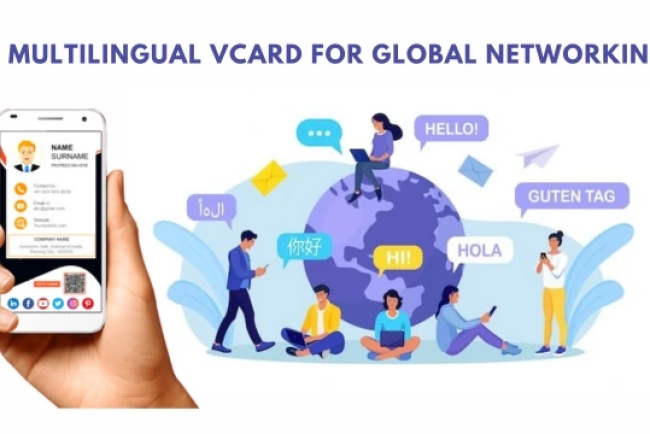
How to Share Your vCard on WhatsApp — One-Tap Contact Save
Share your digital business card on WhatsApp as a link or QR code. Recipients save your contact in one tap — no app needed. Used by 1,120+ professionals across India and GCC.
Updated: 07 May 2026 — expanded with WhatsApp contact-save mechanics, professional use case data, and distribution frequency guide.
Every day, professionals exchange WhatsApp numbers with new contacts and assume the contact was saved correctly. Most of the time, it was not. The recipient typed the number from a paper card and transposed two digits. Or they meant to save it later and forgot. Or they saved it under the wrong name and can no longer find it.
A HelloVcard link sent via WhatsApp eliminates every one of these failure points. Here is why it belongs in every professional WhatsApp chat — and exactly how to use it.
The Problem With Sharing Numbers Directly on WhatsApp
When you share your phone number in a WhatsApp message, the recipient sees a string of digits. To save you as a contact, they have to: copy the number, open their contacts app, create a new contact, paste the number, type your name and company, and save. Most skip this entirely and rely on your name appearing in their WhatsApp chat list — which means they cannot find you once the chat is buried under newer messages.
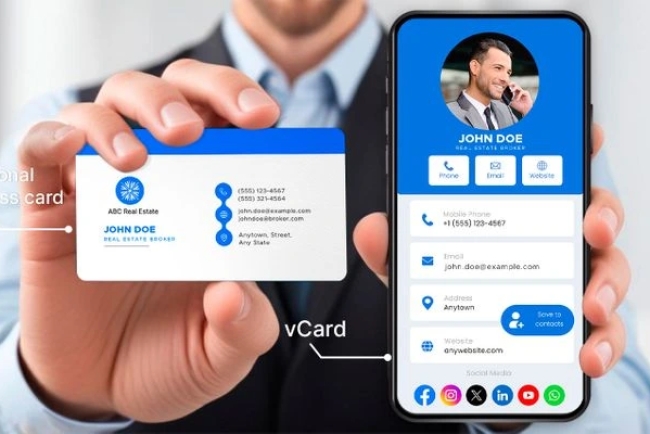
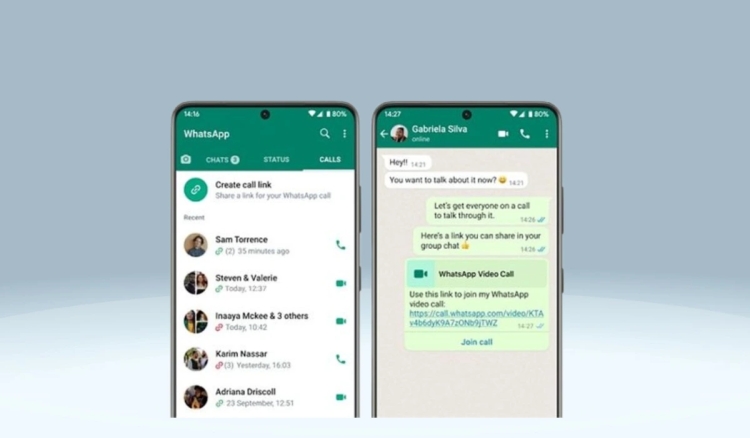
HelloVcard removes this dependency. Send your card link in the chat. The recipient taps it, your card opens in their browser, they tap Save Contact, and your full details — name, designation, company, phone, email, website — write directly to their phonebook via vCard 3.0. One tap. Under 10 seconds. Permanent contact entry. Across 11,380 tracked interactions on the platform, contact saves are the most frequent action taken after a card view.
5 WhatsApp Contexts Where a Vcard Link Changes the Outcome
1. After Meeting Someone at a Networking Event
The standard post-event WhatsApp message is: "Hi, this is [name], great meeting you today." The contact receives the message, sees your name, and moves on. Your number is now in their WhatsApp chat list — searchable only if they remember your name exactly as it appears in their phone.
Add your HelloVcard link: "Hi, this is [name], great meeting you today — here is my card: [HelloVcard URL]." The contact taps the link, saves your contact with full details including your company and designation, and you become findable by name, company, and designation in their phonebook — not just by a WhatsApp chat that will be buried within days.
2. In Business Introductions via WhatsApp Group
WhatsApp business groups are a primary networking channel in India and the Gulf. When you introduce yourself in a group or someone introduces you, sharing your HelloVcard link gives every group member a one-tap path to save your contact. Instead of 15 people individually asking for your number, one link in the group covers all 15 simultaneously.
3. After Sending a Proposal or Quote
A proposal or quote sent via WhatsApp is a high-intent moment — the prospect is actively evaluating whether to work with you. Including your HelloVcard link in the proposal message gives them instant access to your portfolio, your client list, and your booking link — the supporting context that converts a quote into a confirmed project.
"Please find attached the proposal as discussed. My full profile with case studies is here: [HelloVcard URL] — feel free to book a call if you have questions." This message does more selling than the proposal document alone.
4. In WhatsApp Status for Passive Distribution
Your WhatsApp Status is visible to everyone in your contact list who views it — often 50 to 200 people depending on network size. Pinning your HelloVcard link to your Status once a week or after a significant announcement exposes your card to your entire network without sending a single individual message.
Status updates disappear after 24 hours — which creates a natural reason to reshare periodically without appearing repetitive. A professional who pins their HelloVcard link to Status every Monday morning generates consistent passive card distribution across their full WhatsApp network with minimal effort.
5. As Your WhatsApp Bio Link
Your WhatsApp About field (Settings → Profile → About) is visible to anyone who taps your name in a chat. Most professionals leave it as "Available" or a generic line. Adding your HelloVcard URL here means every new contact who receives a message from you can access your full professional profile directly from your WhatsApp profile — without you sending anything additional.
2,659 unique visitors have reached HelloVcard profiles through organic discovery — meaning some of those visits originated from WhatsApp bio links and shared links being forwarded beyond the original recipient. A card that is shared in one WhatsApp chat can travel further than the original conversation.
How HelloVcard Makes Every WhatsApp Chat More Professional
Beyond contact saving, a HelloVcard link in a WhatsApp chat signals a level of professional preparation that a phone number exchange does not. The contact opens a branded, complete profile — your photo, your company logo, your designation, your portfolio link, your booking CTA — rather than a string of digits.
For a freelancer competing for the same project as three other candidates, this difference in first impression is not trivial. The candidate who sends a HelloVcard link alongside their proposal arrives as a more organised, more professional option than the one who shares only a phone number and a PDF.
WhatsApp Vcard Sharing — Best Practices
- Send your HelloVcard link in every post-meeting WhatsApp follow-up — make it a standard close to every new contact conversation
- Add your card URL to your WhatsApp bio so every contact can find your profile without you sending anything
- Pin your card link to WhatsApp Status weekly — 24-hour visibility across your full contact list
- Include your card link in WhatsApp group introductions — one link covers all group members simultaneously
- Add your card link after sending proposals — gives prospects supporting context at the highest-intent moment
- Check your HelloVcard dashboard after high-volume WhatsApp sharing — see which contacts opened the card and follow up with the most engaged ones first
HelloVcard vs Sharing a Contact Card Directly on WhatsApp
| Factor | WhatsApp Contact Share | HelloVcard Link |
|---|---|---|
| Information shared | Name and phone only | Full profile: name, company, designation, email, website, photo, links |
| Portfolio or video | Not possible | Included in card |
| Booking CTA | Not possible | One-tap booking link |
| Updates when details change | Recipient has outdated contact | Card updates instantly — always current |
| Interaction tracking | None | Opens, taps, saves tracked |
| Google searchable | No | Yes — indexed profile |
| Works in email and LinkedIn | No | Yes — same URL everywhere |
How to Set Up Your HelloVcard for WhatsApp Sharing
Step 1: Create Your HelloVcard
Go to hellovcard.com/register and sign up free. Complete your profile — headshot, logo, designation, contact details, and one primary CTA button. Publish your card. Your URL is available immediately.
Step 2: Add Your Card URL to Your WhatsApp Bio
Go to WhatsApp Settings → Profile → About. Replace the default text with your HelloVcard URL. Every contact who taps your name in a chat can now access your full professional profile from your WhatsApp profile page.
Step 3: Build the Post-Meeting Sharing Habit
After every new contact exchange — event, video call, phone call, group introduction — send your HelloVcard link via WhatsApp within 24 hours. A simple message: "Great connecting today — here is my card: [URL]." This single habit, applied consistently, converts more conversations into saved contacts than any other action.
Step 4: Pin to WhatsApp Status Weekly
Every Monday morning, add your HelloVcard URL to your WhatsApp Status with a brief caption: "Connect with me professionally — [URL]." It runs for 24 hours, reaches your full contact list passively, and requires 30 seconds of effort per week.
Frequently Asked Questions
Can I send my HelloVcard link in a WhatsApp group without it looking like spam?
Yes — context determines whether a shared link reads as useful or spammy. In a group introduction ("Hi everyone, I am [name], here is my card for anyone who wants to connect: [URL]"), the link is expected and welcome. In an unprompted broadcast to a group you have not contributed to, it reads as spam. Share with context and relevance.
Does my HelloVcard link generate a preview when shared on WhatsApp?
Yes. HelloVcard profiles include Open Graph meta tags, so when you paste your card URL into a WhatsApp chat, WhatsApp generates a link preview showing your card image, name, and designation. This preview makes the link more recognisable and increases tap rates compared to a plain URL.
What if the recipient is on an older phone that cannot open links easily?
For contacts on older devices, share your QR code as an image in the WhatsApp chat instead of a URL. They can screenshot the QR code and scan it from their phone's camera app. Alternatively, share your contact details manually for that specific contact — HelloVcard is designed for the majority of interactions, not to replace every method.
Your next WhatsApp follow-up message should include your card link. Create your HelloVcard at hellovcard.com/register — free to start, live in five minutes, and ready to share in your next WhatsApp chat.
Build your free digital business card at hellovcard.com/create and review plan options on the HelloVcard pricing page — professional features from ₹99/month.
The Contact-Saving Problem WhatsApp Creates — and How a Vcard Fixes It
When you share your phone number in a WhatsApp chat, the recipient has to manually save it to their contacts. Most don't. The number sits in the chat as a string of digits, unattributed, unsearchable. Three weeks later when they want to reach you, they scroll through dozens of conversations trying to find the one where you introduced yourself. Half give up before they find it.
A HelloVcard link in that same chat changes the mechanic entirely. The recipient taps the link, your full profile loads, they tap Save Contact — and a vCard 3.0 file writes your name, number, email, designation, and company directly to their phonebook. One tap. Permanent. Searchable by name from that moment forward.
When to Share Your Vcard in a WhatsApp Conversation
First message to a new contact: Don't wait for them to ask. The first message in a new professional conversation is the highest-attention moment. Include your HelloVcard link with a one-line context: "Here's my full profile — easier than typing details back and forth." Sets a professional tone immediately.
After every meeting or call: Send your HelloVcard link in the follow-up WhatsApp message within 2 hours of the conversation. The context is fresh, the contact is warm, and the link gives them a reason to save your details rather than just reading the message.
In group introductions: When added to a WhatsApp group, drop your HelloVcard link in your introduction message. Group members who would never directly message you to ask for your contact details can save them passively in one tap.
In broadcast messages: WhatsApp broadcast lists reach multiple contacts simultaneously. Including your HelloVcard link in broadcast messages converts passive recipients into active card-savers without requiring individual conversations.
Vcard Sharing vs Manual Contact Exchange — The Conversion Difference
| Method | Steps for contact to save | Saves to phonebook? | Includes all details? | Trackable? |
|---|---|---|---|---|
| Type number in chat | Copy → open contacts → create → paste → save | Only if they do it manually | Number only | ❌ |
| Screenshot of card | Save image → read → manually enter | Only if they transcribe | Whatever is visible | ❌ |
| PDF business card | Download → open → read → manually enter | Only if they transcribe | Whatever is in PDF | ❌ |
| HelloVcard link in chat | Tap link → tap Save Contact | ✅ Automatic via vCard 3.0 | All fields you set | ✅ View and save tracked |
The Compound Effect — What Happens When You Share Your Vcard in Every Chat
Across 11,380 tracked card interactions on HelloVcard, professionals who share their card link in every follow-up WhatsApp message report the highest contact-save rates. The logic is arithmetic: if you send 20 WhatsApp follow-ups per week and include your HelloVcard link in each, you're generating 20 potential card saves per week. Over a year, that's 1,000 contacts with your details saved correctly to their phonebook — a referral and recall base that compounds with every month you maintain the habit.
Does sharing my HelloVcard link repeatedly in WhatsApp look unprofessional?
Not when it's contextual. Including your card link in a first message or a post-meeting follow-up is standard professional practice — the equivalent of handing over a business card. It becomes intrusive only if sent without context or repeatedly to the same contact. Once a contact has saved your details, they don't need the link again unless your details change.
Can I see which WhatsApp contacts actually opened my HelloVcard link?
HelloVcard tracks card views and link taps by session. You can see how many times your card was viewed and which links were tapped, but not the individual WhatsApp contact who triggered each view — that would require platform-level data WhatsApp doesn't share. What you can see is the aggregate engagement data that tells you whether your card is generating interest after you share it.
What's Your Reaction?