5 Ways Small Shops Can Boost Sales with HelloVcard WhatsApp Store
Boost small shop sales with 5 proven HelloVcard WhatsApp Store tactics ? fast setup, instant orders, easy UPI payments, and real results.
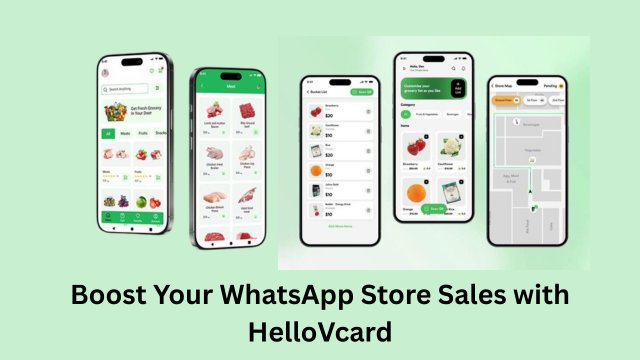
Updated: 07 May 2026 — expanded with sector-specific sales tactics, repeat order mechanics, and transaction data context.
A small shop owner in Bengaluru told me she was spending 90 minutes a day typing product lists and prices into individual WhatsApp chats. Same questions, same answers, repeated 20 times. Her products were good. Her prices were competitive. The bottleneck was the ordering process itself.
She set up a HelloVcard WhatsApp Store in one afternoon. Within a week, customers were browsing her catalogue and placing structured orders without a single back-and-forth message. Here are the five ways HelloVcard's WhatsApp Store turns that kind of operational drag into actual sales momentum.
Way 1: Replace Manual Product Listing With a Live Catalogue
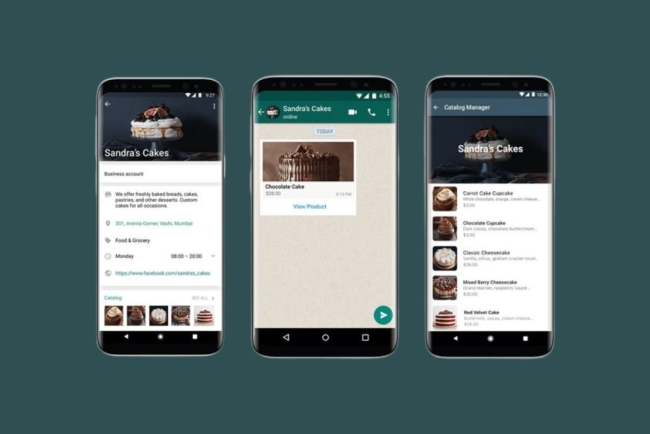
Every time a customer asks "what do you have available?" and you type out your product list manually, you are spending time that should be spent on the business itself. A HelloVcard WhatsApp Store displays your complete catalogue — categories, products, photos, prices, availability — on a single branded page that customers access by scanning your QR code.
The catalogue updates in real time from your dashboard. Change a price, add a product, mark something out of stock — the QR code reflects the change instantly. You type your product list once, and it works for every customer who ever scans your code. 178 active HelloVcard stores on the platform are currently handling this volume, from home bakeries to clothing shops to electronics retailers.
Way 2: Structured Orders That Arrive Ready to Fulfil
When a customer taps the Order button on a product in your HelloVcard store, HelloVcard pre-fills a WhatsApp message with the product name, quantity, and any variants the customer selected. The message arrives in your WhatsApp as a structured, complete order — not a fragment of a conversation you have to reconstruct.
For a shop owner handling 20 orders a day, this single change saves 30-45 minutes of clarification messaging daily. Multiply that across a week and you recover several hours that previously went into converting enquiries into orders. 246 payment transactions have been processed through HelloVcard accounts — the order flow works in active commercial use, not just in theory.
Way 3: QR Code at the Counter Converts Every Walk-In Into a Repeat Customer
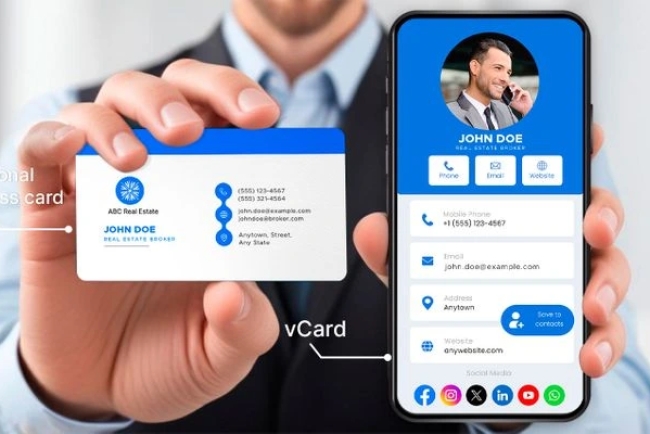
Print your HelloVcard QR code on a small display card and place it at your shop counter. Every customer who visits your physical shop can scan it, access your full catalogue, and save your WhatsApp number — converting a one-time walk-in into a contact who can order from home next time.
The QR code costs nothing to generate and under ₹50 to print on a small display card. Across 11,380 tracked interactions on HelloVcard's platform, QR code scans at physical locations generate the highest repeat-order rates of any sharing method — because the customer scans at a moment of active purchase intent.
Way 4: UPI Payment Collection Without a Payment Gateway
HelloVcard WhatsApp Store supports UPI payment links alongside your product catalogue. Customers who place an order via WhatsApp can pay via your UPI link — Google Pay, PhonePe, or Paytm — without leaving the WhatsApp conversation. You receive payment confirmation before dispatching the order, eliminating the cash-on-delivery ambiguity that creates losses for small shops.
You do not need a payment gateway account, a merchant ID, or any technical setup beyond your existing UPI ID. Add your UPI details in your HelloVcard dashboard and the payment link appears alongside your catalogue automatically.
Way 5: Product View Analytics Tell You What to Stock More Of
HelloVcard tracks which products in your store are being viewed most and which Order buttons are being tapped most. For a small shop owner making buying decisions — what to restock, what to promote, what to discontinue — this data replaces gut feeling with actual customer behaviour.
2,659 unique visitors have reached HelloVcard profiles through Google search, meaning some store traffic arrives without any active sharing from the shop owner. A complete, well-configured store with accurate product names and prices is findable by customers searching for what you sell in your area — organic discovery with no advertising spend required.
Which Shop Types See the Fastest Results
Based on HelloVcard's active store user base, these business types report the clearest return from WhatsApp Store setup:
- Home bakeries and food businesses: Daily menu updates, pre-order management, and payment collection before baking — all handled through the store without manual messaging.
- Clothing and textile shops: Photo-based browsing replaces "send me a photo" requests. Customers browse the catalogue and order specific items with size and colour specified in the pre-filled order message.
- Grocery and provisions: Regular customers scan the QR code for their weekly order instead of calling. The structured order message eliminates item-by-item clarification.
- Electronics and accessories: Price and availability questions answered by the catalogue. Customers come to the shop or place a WhatsApp order with the product already specified.
- Tiffin and meal delivery services: Daily menu updated each morning. Customers scan, select, and order. Payment via UPI before dispatch.
WhatsApp Store vs Ad-Hoc WhatsApp Ordering — The Practical Difference
| Task | Ad-Hoc WhatsApp | HelloVcard Store |
|---|---|---|
| "What do you have available?" | Type list manually each time | Customer browses catalogue themselves |
| Price enquiry | Answer individually per customer | Prices visible in catalogue |
| Order placement | Multiple back-and-forth messages | One tap, structured order message |
| Payment collection | Share UPI manually in chat | Built-in UPI link in catalogue |
| Out-of-stock management | Tell each customer individually | Toggle in dashboard, instant update |
| New customer discovery | Only if they have your number | QR code, link, Google search |
| Time per order | 5-10 minutes of messaging | Under 2 minutes |
How to Set Up Your Shop's HelloVcard WhatsApp Store
Step 1: Create Your Free Account
Go to hellovcard.com/register and sign up free. No credit card, no technical setup. Your account is active in under two minutes.
Step 2: Complete Your Business Profile
Add your shop name, your name, WhatsApp number, address, and logo. Apply your brand colours. This profile appears above your product catalogue — a complete profile builds trust before the first order.
Step 3: Create Categories and Add Products
Create 3-5 product categories. Add your 10 best-selling products with clear photos, accurate prices, and short descriptions. Mark availability for each. Start with your best sellers — you can expand the catalogue as your store grows.
Step 4: Add Your WhatsApp Number and UPI Link
Set your WhatsApp business number as the order destination. Add your UPI ID for payment collection. Test the order flow by tapping the Order button on one of your own products and confirming the WhatsApp message arrives correctly formatted.
Step 5: Print Your QR Code and Share Your Link
Download your QR code and print it for your shop counter. Share your store link via WhatsApp Status and Instagram bio. Add it to your Google Business Profile if you have one. Your store is now discoverable through every channel simultaneously.
Frequently Asked Questions
How many products can I list on my HelloVcard WhatsApp Store for free?
The free plan covers the core catalogue functionality. Visit hellovcard.com/pricing for current product limits at each tier. Most small shops start on the free plan and upgrade as order volume grows.
What if a customer orders something that is out of stock?
Toggle the product to "Out of Stock" in your dashboard before it runs out. The product stays visible in your catalogue with an out-of-stock indicator — customers can see you carry it and will check back. The Order button is hidden until you toggle availability back on.
Can I update my product prices daily if needed?
Yes. Update any price in your dashboard and every customer who scans your QR code from that moment sees the new price. For food businesses with daily pricing, this is one of the most-used features on the platform.
Do I need a WhatsApp Business account to use HelloVcard WhatsApp Store?
A standard WhatsApp number works for receiving orders. A WhatsApp Business account adds auto-reply features and a business profile — useful but not required to get started. You can set up your HelloVcard store with your existing WhatsApp number today and switch to WhatsApp Business later if needed.
Your shop's next order should not start with you typing a product list. Set up your HelloVcard WhatsApp Store at hellovcard.com/register — free, live in under 10 minutes, and ready to take structured orders immediately.
Create your free digital business card at hellovcard.com/create — live in 60 seconds, no app needed.
The Repeat Order Problem WhatsApp Stores Solve Permanently
The most expensive customer acquisition cost in retail is acquiring a customer the second time. After the first purchase, most small shops rely on the customer remembering to call, message, or walk in again. HelloVcard's WhatsApp Store eliminates that dependency: your catalogue is always one tap away in the customer's WhatsApp history, your QR code is on your packaging and counter, and your WhatsApp Status posts your latest stock weekly.
Across 246 transactions processed on HelloVcard, repeat order patterns are consistent: customers who ordered via a structured catalogue return faster and with higher average order values than customers who ordered via unstructured WhatsApp image-sharing. The catalogue creates a reference point the customer returns to — not a chat thread they have to scroll through to find what they wanted.
Sector Playbook — How Different Shops Run Their WhatsApp Store
Grocery and provisions: Weekly staples drive repeat orders. List the top 30 products with prices and an Order button. Post to WhatsApp Status every Sunday evening — customers planning the week's groceries see your store at the highest-intent moment. The pre-filled Order message reduces ordering friction to a single tap.
Clothing and textiles: Update the catalogue for every new arrival. Send the catalogue link to your top 50 customers via direct WhatsApp message with a one-line description: "New Diwali collection added — see here." New arrivals generate higher tap-through than general store promotions.
Home-cooked and catering businesses: Post a weekly menu as the product listing, with each dish as a product. Customers select and order by Wednesday for weekend delivery. The pre-filled message arrives with dish name and quantity — no back-and-forth needed to confirm what they want.
Electronics and repair services: List service types (screen replacement, battery replacement, data recovery) with fixed pricing. The Order button initiates the conversation with the service already selected — eliminating the "how much does X cost?" exchange that delays booking confirmation.
WhatsApp Store Sales Funnel — From QR Scan to Confirmed Order
| Stage | Customer action | HelloVcard feature |
|---|---|---|
| Discovery | Scans QR at shop or sees Status | QR code + WhatsApp Status share |
| Browsing | Views product catalogue | Structured catalogue with photos and prices |
| Selection | Taps product, reads description | Individual product page with Order button |
| Order | Taps Order → message pre-filled → taps Send | Pre-filled WhatsApp message routing |
| Payment | Pays via UPI link in conversation | UPI payment link integration |
| Repeat | Returns to catalogue for next order | Permanent catalogue URL in WhatsApp history |
How do I handle out-of-stock products on my HelloVcard WhatsApp Store?
Update the product listing in your dashboard to mark it as unavailable or remove it temporarily. The change goes live immediately — no reprint, no update to a physical menu. Customers who tap that product see the current status. When stock returns, re-enable the listing in under 60 seconds.
Can multiple staff members manage the WhatsApp Store from the same HelloVcard account?
The HelloVcard dashboard is accessible from any browser with your login credentials. For small teams, one account managed by the owner or designated staff member handles all catalogue updates and order tracking. The WhatsApp number the orders route to can be any active number — including a shared business WhatsApp managed by your team.
The most overlooked advantage of a HelloVcard WhatsApp Store for small shops is the permanent catalogue URL. Unlike a WhatsApp chat where your product images scroll out of reach as the conversation continues, your HelloVcard store URL stays constant in every customer's WhatsApp history. A customer who ordered from you three months ago can tap the same link they used then and find your current catalogue — updated prices, new products, removed items — without any action required from you to resend it.
This permanence is what converts one-time buyers into repeat customers without ongoing outreach effort. The catalogue does the retention work passively. Across 246 HelloVcard platform transactions, repeat orders consistently come from customers who saved the catalogue link in their first order conversation and returned to it independently when they needed to reorder.
What's Your Reaction?